Frequently Asked Questions
Find answers to the questions we hear most.
Weather station FAQ
How many meters can you put thesensors away from the main unit?
Refer Instruction Manuals – between 30- 150 meters “open field”.
How many sensors can you run offthe weather station?
Refer Instruction Manuals – between 3-10 depending on model.
Why does my weather forecaster show rain when it is sunny outside?
It is a forecaster and therefore shows the likely future weather over the next 24 – 48 hours.
How accurate are they compared to my mercury thermometer?
Depends on quality of mercury thermometer but should be equally as accurate and easier to read.
Can the weather stations also pick up the other brands of sensors?
No – products function with only models that pick up Explore signal from sensors.
Which station picks up the pool sensor?
WSX series of Professional stations only.
Why doesn't the radio control clock feature work on my station/clock?
The radio transmission that carries the time information is not transmitted in Australia.
Can outdoor sensors go where there is no cover? Eg, out in the garden
Standard thermo/hygro sensors ST1003-5H) are splash proof but should not be installed in full weather. Outdoor sensor arrays with Pro series stations are fully weatherproof.
Can I calibrate the sensors individually?
Yes, via the Pro weather link page. Under the advance Tab, sensors can be adjusted to offset or gain values to calibrate them. Refer to WSX Pro manual.
Can the weather stations run off rechargeable batteries?
Yes they can.
Can the WSX series be attached to a mobile campervan?
Yes but wind direction will not operate correctly as the sensor needs to be set up to reflect true direction. Also weather forecast and barometric pressure will be affected by changes in altitude.
Does the WSX series come with software?
No, however it can be synched with Weather Underground and Weathercloud software.
How does WSX series access time? Does it run off the RF Function? And will it work in Australia?
It uses the connection to your router to sync with Wi-Fi/internet time. It does not work from RF signal and therefore is not country specific.
Does it adjust automatically to Daylight savings time?
No, you need to log back into the Pro weather link set up page (192.168.1.1) and adjust your GMT.
Why is my Sunset and Sunrise times incorrect?
You will need to enter your longitude and latitude coordinates according to your location via the Pro weather link page (192.168.1.1).
What is the maximum for the wind speed sensor on the WSX Weather Stations?
Circa 200 km/h. More likely to be taken out by debris than fail in heavy winds.
What is the max/min temp the units can handle? Will the sensor be damaged in extreme hot or cold weather? What temps can it with stand?
Sensors can read from -20°C to + 60°C. Not many areas in Australia would be affected by temperatures outside these extremes.
How do you read a graphical trend indicator? What is the purpose of having a graph?
If the arrow is pointing up the temp/humid/baro is trending higher etc. It is of general interest and allows users to track for example the barometric pressure over the past 24 hours.
Do the wireless weather stations suffer interference from other wireless units? (internet, phone, etc)
Yes, all our products are classified Low Interference Potential Devices and must accept interference from other devices. Garage door openers/alarms/and other RF product may interfere with sensor transmissions.
When it says the WSX can take "up to" ten channels does that include or exclude the sensors/rain gauge/anemometer that it comes with?
It includes the Thermo Hygro, Rain Guage, UV and wind sensors. Please refer to model specs for additional sensor pairing capabilities.
Can I replace my sensor if they fail?
Yes, on all desktop versions, the sensors can be replaced individually. On the WSX series, the entire array must be replaced.
Can I clean my unit?
Yes, in particular the outdoor sensors. WSX series should refer to instruction manual for maintenance guide.
I have changed the batteries in the sensor and it's not picking it up, how do I fix this?
Follow the reset instructions outlined in the manual.
What is the warranty on my model?
All Explore Stations come with a 3-year manufacturing warranty.
Which time zone do I set my clock to?
EST (refer to manual).
How long does the WSX series hold information for?
The console has built-in FLASH memory that holds vital settings which include: Time Zone, DST status, Time SYNC status, WI-FI and Weather server setting, Latitude / Longitude, Hemisphere setting, Calibration values, and Sensor ID of paired sensor(s). The data needs to be logged with WU or WC programs.
Do I need to update my firmware?
The console supports OTA firmware update capability. Its firmware may be updated over the air anytime (whenever necessary) through any web-browser on a PC with WI-FI connectivity. Update function, however, is not available through mobile/smart devices.
Why isn't the min/max changing at the start of each day?
Depends on model however typically Min/Max records are “cumulative” therefore if you want min/max each day you must reset the min/max function as per instructions.
Can you get replacement parts for the WSX professional series?
No, the sensor array is an all-in-one attachment.
Where do I find the software to log data for my WSX series?
Go to: https://www.wunderground.com/ and/or https://app.weathercloud.net/
Can I rotate the reading from my projection clock?
Yes you can rotate/flip the projection from your clock. Please refer to manual for instructions on how.
Does my projection clock project continuously?
Yes it can when plugged in the main power only. This is a precaution to save battery power. Refer to manual for on/off continuous projection function.
Do the Pro series come with Apps for my phone?
No, however you can download the PWS weather app to pair with your station as per outlined in the instructional manual.
Are we allowed to special order products that we do not sell? What about extra sensors - ones we do not sell?
Please contact retailer or Explore Scientific/Proline Australia customer support for details.
Resetting Your Desktop station and sensor/s
Soft Reset
In order for your head unit and sensor to be recalibrated you must follow the reset process in step order:
Step 1 Reset the sensor
- The reset button is found in the battery compartment of the sensor
- Using a small & sharp object press into to the pin push hole marked with ‘reset’
Step 2 Reset the Main Unit
- The reset button is found on the back of the main unit
- Using a small & sharp object press into to the pin push hole market with ‘reset’
Your unit and sensor should now be calibrated
Hard Reset
- remove all the batteries from your sensor/s and head unit.
- Unplug head unit from main power
- Leave all units unpowered for 5 mins
- Reinsert batteries and main power to all units
- Using a small & sharp object press into to the pin push hole market with ‘reset’ where able to on the sensor and head unit.
Your unit should now be calibrated.
Resetting For Professional Weather Station
In order for your unit to recalibrate effectively the following reset
process must be carried out in order
Step 1 Reset the senor or sensors
- In most cases the reset pin push button can be found on the back of the sensors
- In some cases the reset pin push button can be found in the battery compartment of the sensor
- The WSX sensor array reset button is found on the bottom of the array
- Using a small sharp object press the reset pin push button
Step 2 Reset the main unit
- In most cases the reset pin push button can be found on the back of the unit, on the front of the unit, or on the battery compartment of the unit
- Using a small sharp object press the reset pin push button
Give you unit & sensor some time to recalibrate and pick up signals
Hard Reset
- remove all the batteries from your sensor/s and head unit.
- Unplug head unit from main power
- Leave all units unpowered for 5 mins
- Reinsert batteries and main power to all units
- Using a small & sharp object press into to the pin push hole market with ‘ reset’ where able to on the sensor and head unit.
Give you unit & sensor some time to recalibrate and pick up signals.
Installing your WeatherStationWSX 1001/3000/3001/3008
Wind, air temperature, and water vapour pressure measurements are affected by surface type and roughness, soil moisture, regional topography, and obstructions.
Sites selected for their applicability to a broader area should be free from obstructions such as buildings, trees, and steep slopes. Ten-meter towers are often used to raise measurement heights above low-lying obstructions.
The following table lists the suggested measurement heights and exposure (distance to an obstruction) for each type of sensor.
Wind
Height/Depth: 3 m ± 0.1 m recommended (AASC); 2 m ± 0.1 m or 10 m ± 0.5 m optional (AASC); 10 m (WMO & EPA)
Exposure: No closer than ten times the obstruction's height.
Air Temperature & Relative Humidity
Height/Depth: 1.5 m ± 1 m (AASC); 1.25–2.0 m (WMO); 2.0 m for temperature only (EPA); 2 m & 10 m for temperature difference (EPA)
Exposure: Must be housed in a ventilated radiation shield to protect the sensor from thermal radiation. The EPA recommends no closer than four times the obstruction's height and at least 30 m from large paved areas. If no shield is available, mount in a shaded south-facing location.
Solar Radiation
Height/Depth: Consistent with the exposure standard (AASC, WMO, EPA). To facilitate levelling/cleaning, CSI recommends 3 m or less.
Exposure: No surrounding object should block the sky. Objects under 10° above the horizontal plane of the sensor are allowed.
Precipitation
Height/Depth: 1.0 m ± 0.2 m (AASC); 30 cm minimum (WMO)
Exposure: AASC & EPA suggest no closer than four times the obstruction's height. The orifice must be in a horizontal plane, open to the sky, and above the level of in-splashing and snow accumulation.
What is the maximum transmission distance between the console and the remote sensors?
150 metres for a clear line of site. This distance varies as a function of obstructions (water, concrete and metal can shorten this distance), but is dependent on your particular installation.
How long do the batteries last in the remote solar transmitters?
It depends on the installation and environmental factors, but 1year is normal. Lithium batteries are recommended for colder climates. Please note the solar panel on the WSX3001 does not provide power in extending battery life therefore all sensors must have viable batteries installed to transmit data.
Where should I place my sensors?
Place the array in the highest location possible. This will eliminate any obstructions. Remember that you will need to change the batteries once per year, so make it accessible.
The temperature and humidity sensor have a built-in fan which provides ventilation for the ambient temp and humidity sensor. Radiant heat transfer from your house can raise the temperature as much as 6 deg F, so keep away from walls that receive a lot of sunshine.
The rain gauge should be kept free of obstructions such a spider web build up and debris that may clog the entry point for water. The gauge can freeze in cold climates, and debris must be cleared on occasion.
Optional sensors for temperature and Humidity in extra locations must also be kept within the maximum transmission ranges.
How should I mount the array?
You will need a metal pole. In some environments, you can use PVC pipe. Mount the brackets to the pole.
My barometer is reading too low. Shouldn't it read between 29.00 and 31.00 in Hg? How do I correct the barometer to sea level?
To compare pressure conditions from one location to another, meteorologists correct pressure to sea level conditions. Because the air pressure decreases as you rise in altitude, the sea-level corrected pressure (the pressure your location would be at if located at sea-level) is generally higher than your measured pressure. Thus, your pressure may read 28.62 in Hg (969 mb) at an altitude of 1000 feet (305 m), but the corrected pressure is 30.00 in Hg (1016 mb). The standard sea-level pressure is 29.92 in Hg (1013 mb). Pressure conditions greater than 29.92 in Hg (1013 mb) are considered high pressure and less than are considered low pressure.
One of the sensors read "Er". How do I troubleshoot this problem?
Make sure that the sensor transmitter light is flashing read once every 15-30sec. If not, replace the batteries. If the problem remains with the sensor, perform a hard reset.
Installation suggestions for WSX Pro Weather Stations All in one Sensor Array
- Anemometer (wind gauge)
The anemometer consists of a solar
powered data transmitter and a wind vane (direction) and cup anemometer
(speed).
The ideal positioning for this unit is in open space where there are no wind shadows caused by buildings or trees – often the best position is located on a TV antenna on the roof of your property.
The unit has a transmission range of up
to 150m (line of sight). Positioned on most rooftops should cause too many problems, just ensure the receiver main unit is on the same side of the house as walls and windows reduce the range.
- UV Sensor
The UV sensor should is located on the
side of the unit and when set correctly will display light intensity, UV index
& sunburn time The panel should be free from obstruction.
- Rain Gauge
The rain gauge consists of a transmitter
and a self empting rain bucket.
The ideal positioning for this unit is
in an open space where precipitation can easily fall in to the gauge. Ensure
there is no rain shadow caused by trees or buildings.
The unit has a transmission range of up
to 150m (line of sight). Positioned at the end of most back yards should not
cause too much of an issue with range, just ensure the receiver main unit is on
the same side of the house as walls and windows reduce the range.
- Thermo/Hygrometer
The thermo/hygrometer consists of a data
transmitter and a thermo/hygrometer sensor (looks like a microphone).
The ideal positioning for this sensor is
on the wall or post mounted above ground level, but with a good air circulation
and in the shade – ambient temperature and humidity readings are always
measured in the shade.
The unit has a transmission range of up
to 150m (line of sight). Positioned at the end of most back yards should not
cause too much of an issue with range, just ensure the receiver main unit is on
the same side of the house as walls and windows reduce the range.
- Additional Thermo/Hygro sensors
This unit is designed as an indoor
sensor and should be ideally located anywhere inside the house or in other
housed locations
Please note that the outdoor sensor array is weather resistant and should easily cope with the rigors of most weather conditions.
Moon Phase and Tides
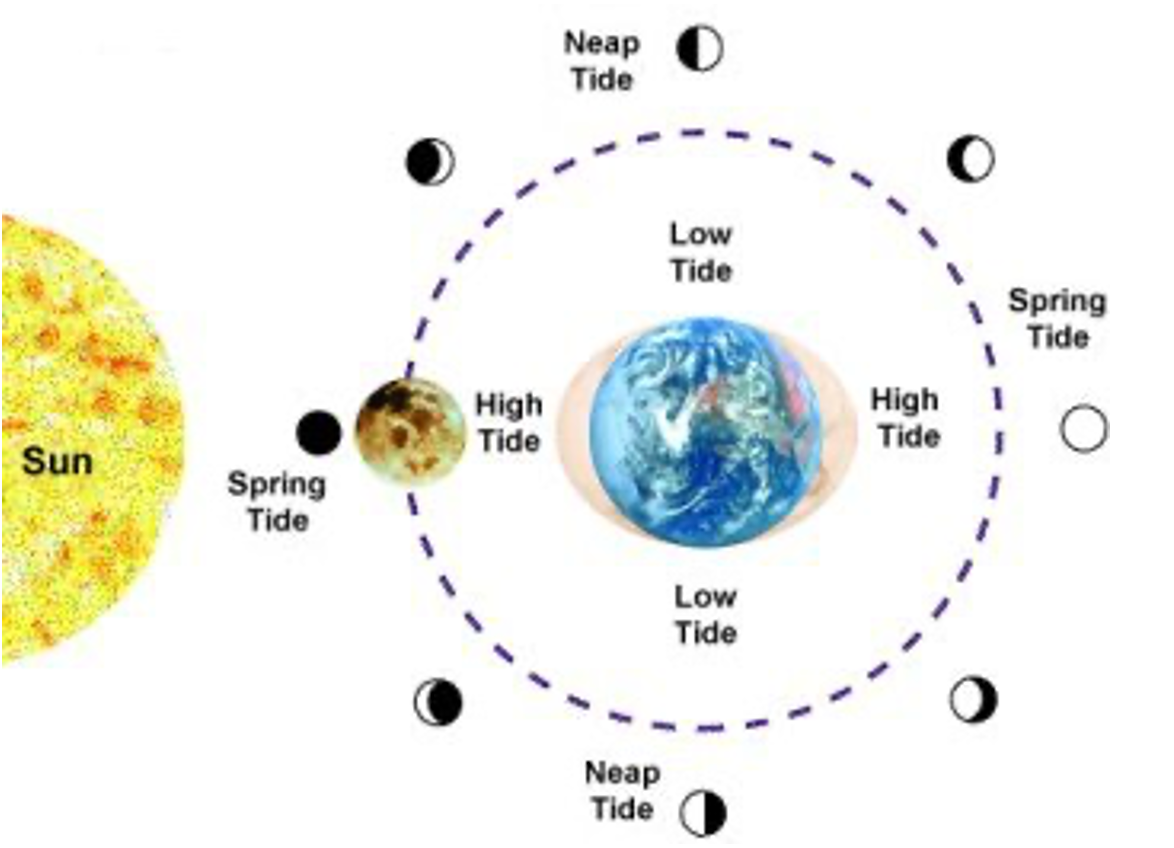
Moon Phase / Tide indicators by Explore Scientific weather stations:
The diagram below shows the main states of the moon and the effect these have on the tides.
Spring Tides: these are defined as the highest high tides and the lowest low tides,
they occur when the Earth, Moon and Sun all lie in the same plane (their gravitational pull act in the same direction increasing the pull and movement of water around the Earth). This occurs at full and new moon.
Neap Tides: these are defined as the lowest high tides and the highest low tides,
they occur when the Sun and Moon lie perpendicular to each other (their gravitational pull lessens the movement of water around the Earth). This occurs in the first and last quarter.
Median tides occur at all other times when the moon phase is at waxing/waning crescent or waxing/waning gibbous.
Please note: The moon phase on shows tidal range at anyone point in time, it will not specify exactly when high/low tide is at your local port. You will need to refer to your local tide chart for this information.